Your recurring PM work. Handled.
Plank pulls from Jira, Slack, Notion, and analytics to write briefs, update tickets, send messages, and prep your roadmap — not just docs, real actions.
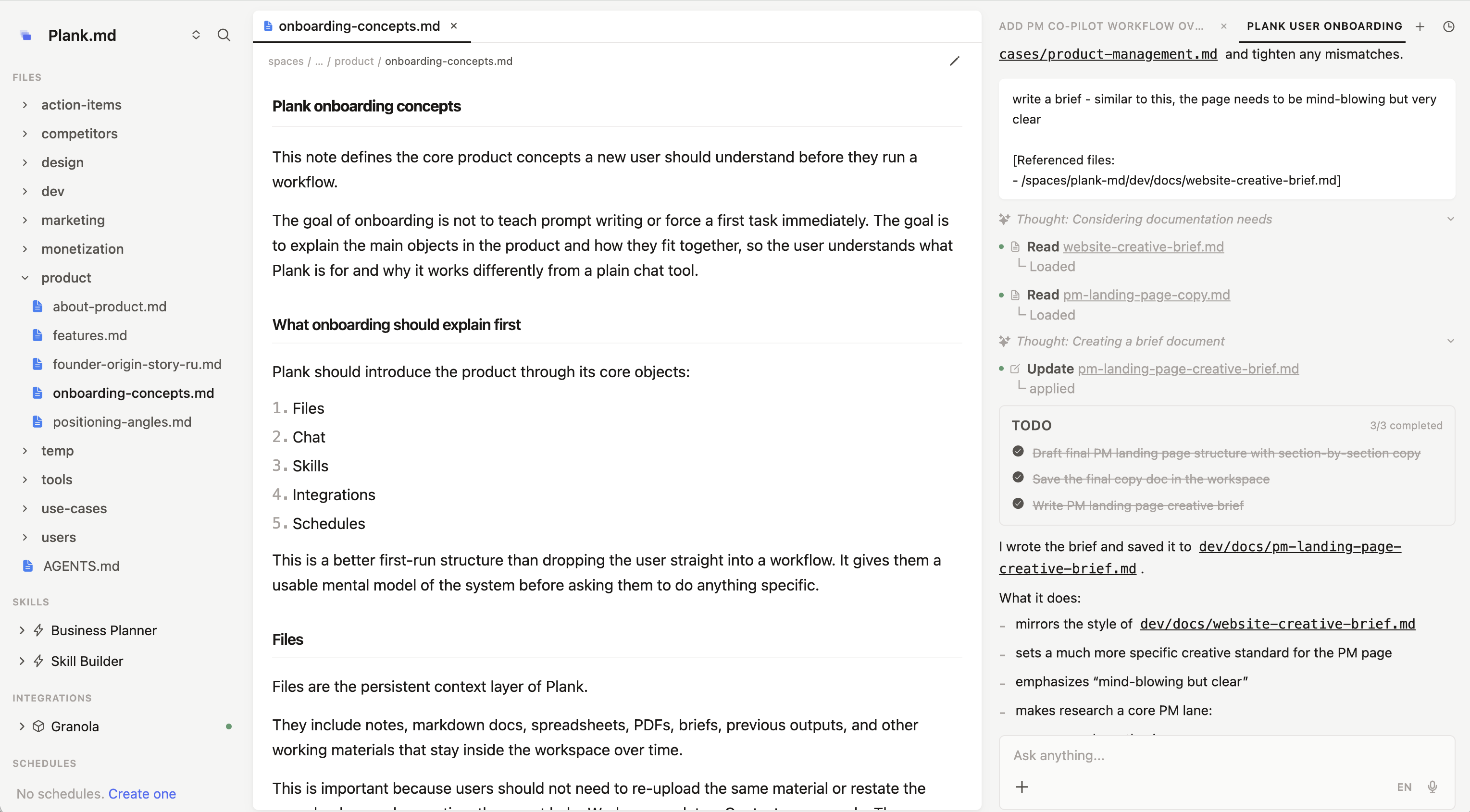
From scattered inputs to finished work.
Pick a workflow. Watch the agent pull data, synthesize it, create docs, update tickets, and share results.
Weekly Product Brief
Every week
 PullingJira sprint board
 PullingSlack #product
 PullingAmplitude
 PullingNotion
Chat resets every session. Plank keeps the system running.
Conversation resets each session
Paste text into a prompt box
Text replies you copy-paste elsewhere
Re-explain every time
Prompts live with individuals
Copy-paste prompts each time
Manual — you run it every time
 Plank for PMs
Persistent files
Markdown, scripts, PDFs — always there between sessions.
Organized by folders
Structure context the way you think. Projects, topics, sprints.
Rich context & memory
Notes, research, decisions — the agent remembers everything.
Active document
Work on a note or file while the agent assists in real time.
AI agent
Does the work. You guide, review, and ship.
Skills
Reusable workflows you run with one click.
Schedules
Recurring tasks on autopilot. Daily, weekly, custom cron.
Plank fits the tools you already use.
Any tool with an API or MCP server works with Plank.
 1C
1C Bitrix24
 amoCRMJira
 Linear
 AsanaSlackNotion
 Confluence
 Google Docs
 Amplitude
 Mixpanel
 Google Sheets
 Google Drive
 Zendesk
 Intercom
 Granola
 Google Calendar
 Google Meet
 Zoom
Zoom Gmail
Gmail Apple Notes
 Reminders
Cheaper than another PM. More output than three.
Every plan includes a 7-day free trial. Cancel anytime.
For occasional help - a few personal projects a month, from planning and research to health, learning, or sorting your documents.
For everyday help across your life - planning, health and finances, learning, and the recurring tasks you'd rather hand off.
For relying on Plank all day - running your whole personal life and bigger projects, with high-volume research whenever you need it.
Compare features by plan
Same quality on every plan - the only difference is how much work it includes.
| Starter | Plus | Pro | |
|---|---|---|---|
| AI usage | |||
| Monthly AI usage | 1× | 2.5× | 5× |
| Workspace & storage | |||
| Workspaces | 3 | Unlimited | Unlimited |
| Storage | 10 GB | 25 GB | 50 GB |
Frequently asked questions
Every plan works at the same quality. What changes between plans is how much work you can do each month - the amount of reading and writing Plank does for you. Think of it like a data plan: Starter is for light, occasional use; Plus covers daily work across several processes; Pro handles heavy, continuous usage. You can always upgrade if you outgrow your plan.
Everything the AI processes: reading your files and context, searching the web, and producing output (reports, documents, dashboards, responses). A complex spreadsheet analysis uses more than a quick question. Plank tracks this transparently so you can see where your usage goes.
Yes. You can upgrade or downgrade at any time. Upgrades take effect immediately; downgrades take effect at the end of your current billing period.
Plank uses a fair-use model with gentle reminders as you approach your monthly capacity. If you consistently hit the limit, upgrading to the next tier is almost always cheaper per unit of work.
Every plan starts with a 7-day free trial with full access. For companies, we also offer a paid proof-of-concept on a real business process before you commit.
Common questions from PMs.
You connect your accounts once — Jira, Slack, Notion, analytics. Plank reads from them when you run a workflow. Your credentials are encrypted and you can revoke access anytime.
No. Plank has a persistent file system, reusable workflows, source integrations, and structured output generation. Chat tools reset every session. Plank keeps your context and builds on it over time.
Plank is not replacing your docs. It reads from them as sources and produces artifacts you can export back. Think of it as the working layer between your tools and your deliverables.
Yes. Every workflow is editable. Change the inputs, adjust the output structure, add your team's specific context. Save it and reuse it every week.
Plank works with your actual data — not guesses. Outputs are grounded in the sources you connect. You always review before sharing. The goal is to reduce assembly time, not replace your judgment.
All the popular ones — ChatGPT, Claude, and more. AI is included with your subscription, so you don't need a separate account to get started.
7-day free trial with full access. After that, Personal plans start at $49.99/month with AI included — no separate AI bills.
Yes. Team plans support shared workspaces, shared workflows, and shared context. Everyone on the team can run the same weekly update workflow against the same sources.
Every workspace is isolated. Your data is encrypted at rest and in transit. We never train on your data. Enterprise plans include SSO, dedicated infrastructure, and custom data residency (coming soon).
Get rid of routine work and save 10+ hours a week.
Plank pulls context from Jira, Slack, Notion, and analytics to prep updates, synthesize research, and keep your roadmap current.